
Ecomobi is proud to introduce the Coupon Generate feature. This powerful tool is designed specifically for Publishers running website traffic (Bio pages, Review sites, Landing pages). It allows you to create professional, customizable voucher widgets that automatically display the hottest deals from Shopee, Lazada, Tiki, and more.
What is “Coupon Generate”?
In today’s increasingly competitive landscape, optimizing campaign performance and improving conversion rates (CR) are top priorities for every Publisher. Understanding this need, Ecomobi officially launches Coupon Generate – a powerful feature that allows Publishers to create exclusive discount codes instantly, giving you a strong advantage in boosting sales.
Alongside coupon creation, Ecomobi also enhances the experience with two essential supporting tools: Coupon Generate (includes Widget Management and Coupon Management). Together, these tools help Publishers control how their coupons are displayed, attach links, track performance, and optimize the buyer journey.
Why should publishers use Coupon Generate?
Coupon Generate is a feature that allows Publishers to create their own discount or promotional codes based on available categories.
- Competitive advantage: You no longer need to wait for advertisers to issue codes – create your own at any time, especially during high-demand moments such as Flash Sales, Payday, and Festival campaigns.
- Higher conversion rates: Shoppers always respond better to promotions. Having your own unique code helps you close more deals.
- Smart tracking: When a user clicks a voucher and completes a purchase, the order is accurately recorded for you.
- Greater speed and autonomy: Publishers can create, edit, and optimize instantly without relying on third parties.
Step-by-step guide to Widget Management
Think of the “Widget” as the beautiful frame that holds your coupons. Here is how to set it up (Referencing the Settings workflow):
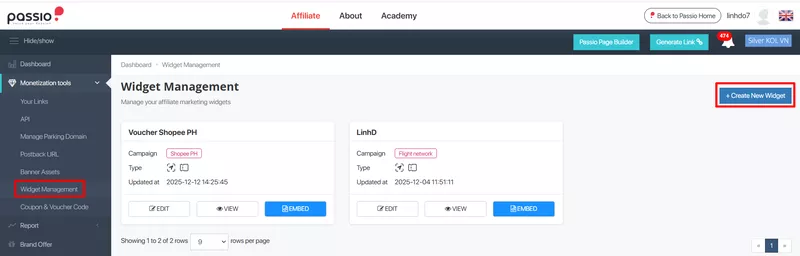
Step 1: Access widget management
- Login to your Ecomobi/Passio Dashboard > Navigate to the “New” menu and select “Widget Management” > Click the “Create New Widget” button.
Step 2: Customize your theme
- Widget name: Name your configuration
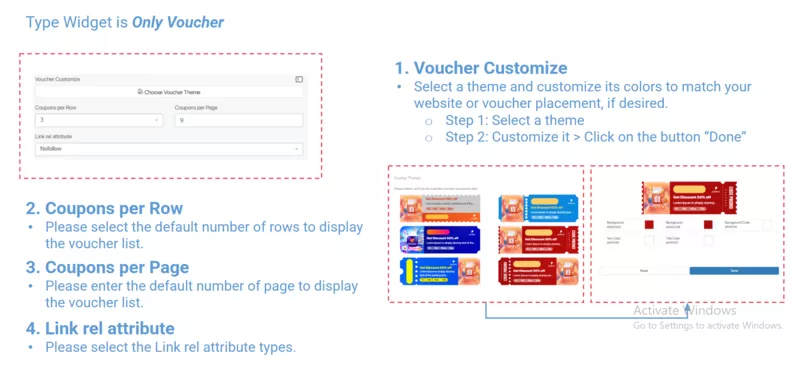
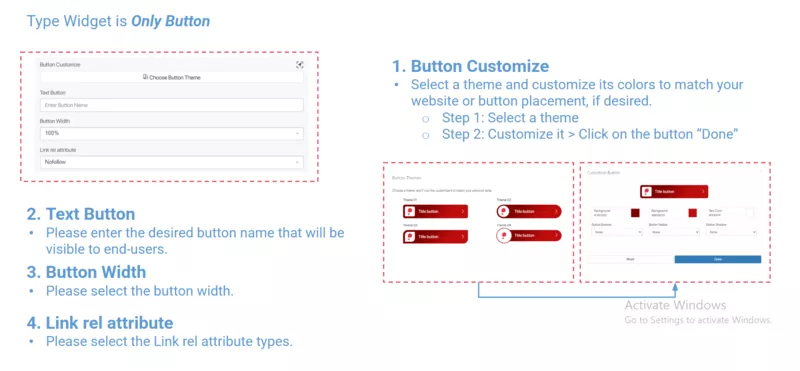
- Select Widget Type: Choose how you want the coupons to appear (Button, Voucher, Both Botton and Voucher).
- Campaign: List of campaigns the publisher has joined and is approved to generate link for.
Step 3: Complete & Embed
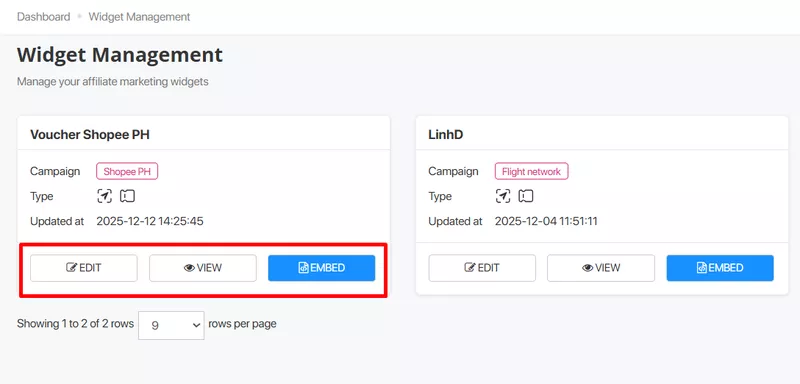
- Click Create Widget. After this, you can see the visual how the voucher or button will appear on the website after configuration.
- The system will generate an Embed Script.
- Copy this script and paste it into the HTML of your Website, Landing Page, or Bio Link.
- You can edit Widget: Click on the menu New > Widget Management > Edit.
Step-by-Step guide to Coupon Management on Ecomobi
Now that you have the frame (Widget), you need to fill it with content (Coupons). You can access this via the “Coupon Management” menu.
Method A: Using system-crawled coupons
Ecomobi automatically crawls coupons from major platforms (Shopee, Lazada, Tiki,…). You can simply search and select these to add to your widget.
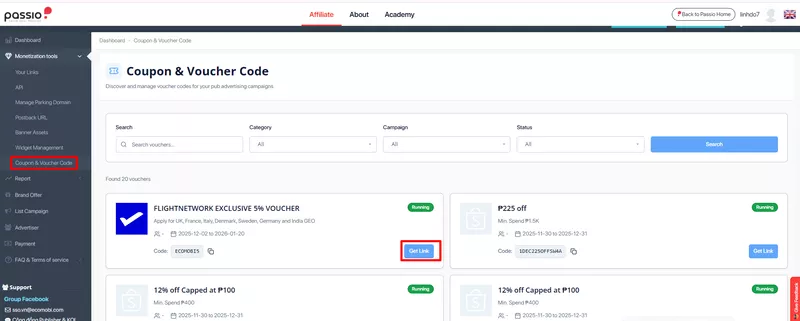
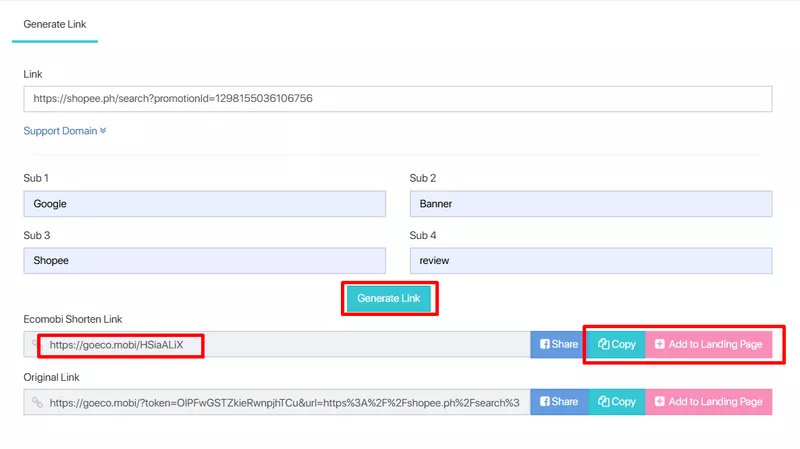
Method B: Creating a custom Coupon (Manual)
Step 1: Create Coupon: Login Domain system > Click on the menu “New” > Click on “Coupon Management” > Click “Create”
Step 2: Fill in the required fields:
- Username: Enter a specific creator’s username if the code is exclusive. Leave blank if it applies to everyone.
- Promo Title: A concise name (e.g., “50% OFF Cosmetics”).
- Campaign: Select the advertiser (e.g., Shopee, Lazada).
- Promo Code: The actual discount code (e.g., SALE99).
- Promo Subtitle: Terms and conditions (e.g., “Min spend 200k”).
- Category: Select the industry (Beauty & Health, Travel, Financial, Electronics, Marketplace,…)
- Upload an image and set the Time/Stock availability.
Step 3: Click Submit.
Managing & optimizing your coupons
To keep your website fresh, you need to manage your inventory.
- Deleting coupons: You can delete individual records or use checkboxes to “Delete Selected” in bulk.
- Campaign compliance: If you are blocked from a campaign due to violations, the embed code you pasted will stop working. You will need to rejoin the campaign and create a new widget record.
The Coupon Generate feature is more than just a tool; it is your automated sales assistant. By displaying the right vouchers in a professional widget, you remove friction for your followers, making it easier for them to buy and easier for you to earn.
Contact us, Ecomobi:
– Fanpage: https://www.facebook.com/ecomobi.ssp
– Instagram: https://www.instagram.com/ecomobi_ssp
– Tiktok: https://www.tiktok.com/@ecomobipassiovietnam
– Email: info@localhost