
Have you ever posted a TikTok only to realize there was a typo in the captions? Or perhaps you’re doing a complete profile rebrand and need to clear out old content. Simply knowing how to delete video in TikTok is easy, but managing reposts, bulk deletions, and saving your engagement stats requires a bit more strategy.
Quick answer: How to delete a TikTok video
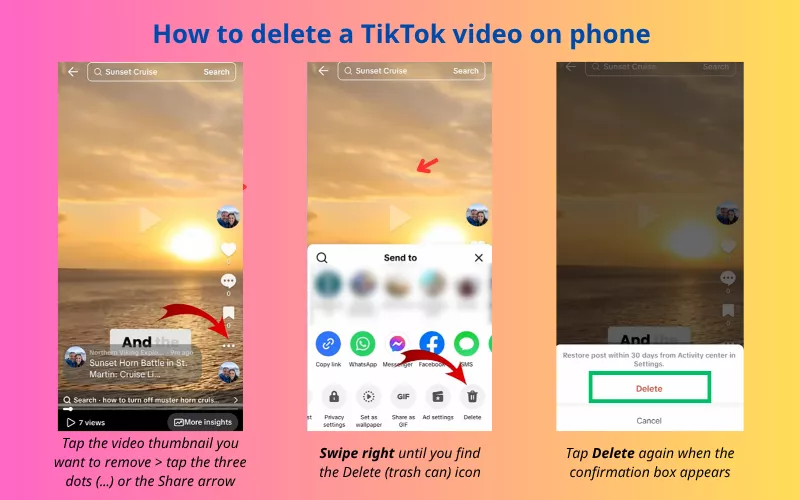
To delete a video on TikTok, open the app and go to your Profile. Tap the video you want to remove, then tap the three dots (…) or the arrow icon on the right side. Swipe through the bottom menu options until you see Delete. Tap it and confirm.
Note:
- Deleted videos cannot be recovered
- To hide a video without losing your likes, use the Privacy Settings > Only Me option instead.
How to delete a TikTok video on phone (iPhone & Android)
The process for how to delete video in TikTok on iPhone and Android is identical because TikTok maintains a unified interface across mobile platforms.
- Go to your Profile: Tap the icon in the bottom right.
- Select the video: Tap the video you want to remove.
- Open the menu: On the right-hand side of the video, tap the three dots (…) or the Share arrow (location varies by region).
- Delete: In the bottom row of gray icons, swipe all the way to the right → Tap the Delete (Trash Can) icon and confirm..
How to delete a TikTok Video after posting
If you’ve just hit “Post” and realized there’s a mistake, you can remove it instantly. However, keep in mind that once a video is live, even for a few seconds, it may have already been seen or downloaded.
- Quick fix: Follow the steps above immediately.
- Pro tip: Instead of deleting and re-uploading (which can sometimes trigger a “low-quality content” flag from the algorithm), consider using the “Edit Video” tool for captions or tagging if the option is available in your region.
How to delete video in TikTok repost (Step-by-Step)
Many users accidentally repost a video while scrolling through their “For You Page” (FYP). Learning how to delete a TikTok repost is slightly different because it isn’t “your” video.
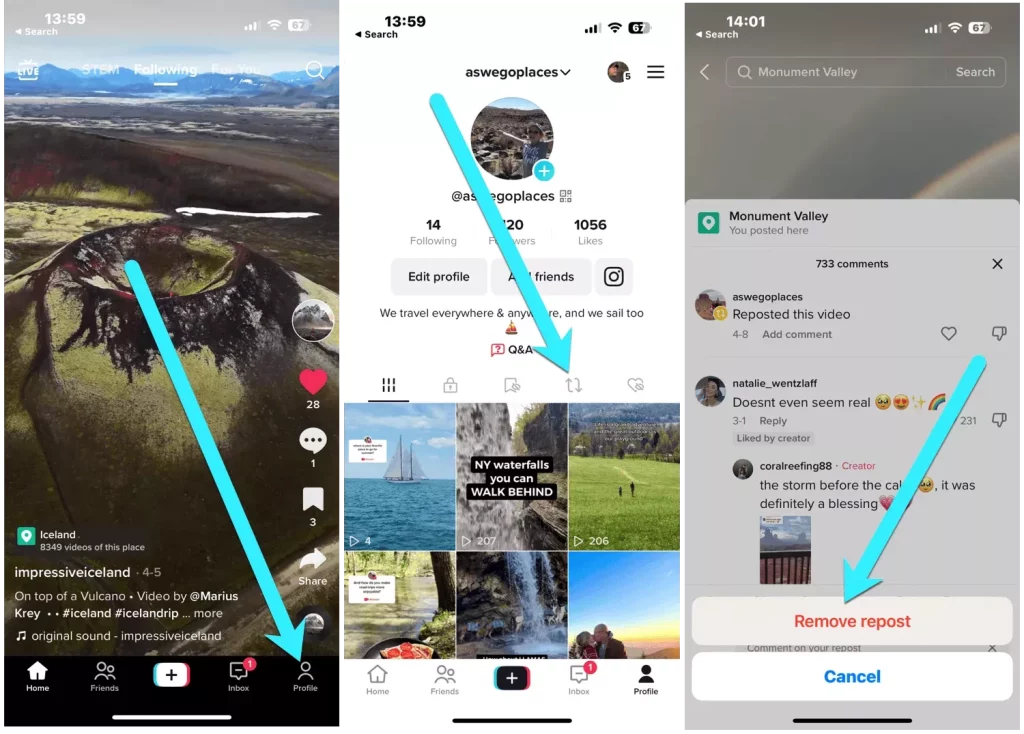
- Step 1: Go to your Profile → Tap the Repost icon (it looks like two spinning arrows) located in your profile’s middle navigation bar.
- Step 2: Select the reposted video → Tap the Share arrow icon.
- Step 3: Tap the yellow button that says “Remove Repost“
For more TikTok privacy policy tips, check out our guide on [How to Enable 2-Step Verification for TikTok] or [How to recover TikTok account]
Discover 15+ Best TikTok niches 2025 for affiliate and viral video
How to delete TikTok videos at once (Bulk Delete)
One of the most searched queries is how to delete TikTok videos at once. As of 2026, TikTok does not offer a native “Select All” button to mass delete videos. This is a security feature to prevent hackers from wiping an account instantly.
Solution:
If you have 20+ videos and don’t want to delete them one by one, use the Desktop/Web
- Step 1: Log in to TikTok.com on a computer. Use Redact.dev (have paid) or DeleteTik (browser extension)
- Step 2: Navigate to your profile.
- Step 3: Right-click “Delete” is faster on a desktop, or use a trusted Chrome Extension like “TikTok Video Manager” (Use with caution to avoid shadowbans).
But remember, mass deletion of videos on TikTok can temporarily reduce views due to the loss of interaction data and force the Tiktok algorithm to “relearn” the channel; however, if only low-quality or off-topic videos are removed in a controlled manner, the impact will be negligible and may even improve overall performance.
Additionally, you might implement the wrong solutions:
- Individual deletion: The safest, albeit slowest, way.
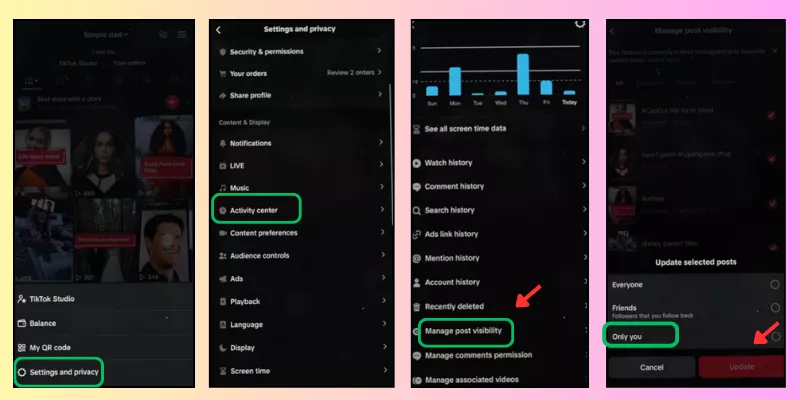
- The “Private” batch method: Instead of deleting:
- Go to your Profile and tap the three-line menu (☰).
- Settings and Privacy → Activity Center → Manage post visibility (Then you select the videos you want to delete (hide)
- Choose “Only You“. While not a deletion, it clears your public profile instantly.
Read more:
How to “Delete” videos without losing likes
When you delete a video, the likes associated with that video are subtracted from your total “Likes” count on your profile. If you want to know how to delete videos on TikTok without losing likes, there is only one “hack”: Set the video to Private.
- Step 1: Open the video and tap the three dots.
- Step 2: Select Privacy Settings → Change “Who can watch this video” to Only Me.
Result: The video is gone from the public eye, but your Total Likes remain intact. This is the best way to “rebrand” your account without looking like a new user.
How to delete all TikTok videos without deleting your account?
If you want a fresh start but want to keep your followers and username, follow these steps:
- Request your data: Go to Settings → Account → Download your data. Save your videos first!
- Systematic privacy: Use the “Privacy Hack” mentioned above for every video.
- Contact support: If you have thousands of videos, you can contact TikTok support and request a “Content Reset” for privacy reasons, though this is rarely granted.
Troubleshooting Hub: Why you can’t delete a video
Error: “The Delete button isn’t there!”
> Solution: You are likely trying to delete a “Draft” or a “Repost” from the wrong menu. Go to the specific tab for that content type first.
Error: “I deleted it, but it’s still showing up.”
> Solution: This is a Server Cache issue. Clear your TikTok cache: Settings → Free up space → Clear Cache.
Error: “Can I delete a video from a banned account?”
> Solution: No. You must appeal the ban and regain access before you can delete content.
FAQ about how to delete video in Tiktok
Why can’t i delete a video Tiktok?
– Processing status: You cannot delete a video while it is still uploading or being “processed” by TikTok’s servers.
– Server lag: Sometimes, after clicking delete, the video stays visible for a few minutes. Refresh your app.
– App version: Ensure you are on the latest version of TikTok.
How to recover deleted videos on Tiktok?
No. Once you tap “Confirm Delete,” the video is permanently removed from TikTok’s servers. Unless you have the video saved to your phone’s camera roll or a backup cloud, it is gone forever.
How to delete all TikTok videos at once without deleting your account?
There is no official “Delete All” button. The safest way is to manually delete them or change your entire account privacy to “Private” to hide everything instantly.
Does deleting videos hurt your TikTok algorithm?
Deleting a single video occasionally won’t hurt your account. However,mass deleting 20+ videos at once signals “suspicious activity” or “unstable” to the algorithm. We recommend setting them to “Private” instead.
Managing your TikTok profile is essential for maintaining your personal brand. Whether you choose to delete, repost, or simply hide your content, always ensure you have a backup of your favorite videos before hitting that final button.
Check out our latest article on a case study about increasing revenue by over 250 times in just one month with TikTok LinkShare Ecomobi.
Contact Us:
– Fanpage: https://www.facebook.com/ecomobi.ssp
– Tiktok: https://www.tiktok.com/@ecomobipassiophilippines
– Instagram: https://www.instagram.com/ecomobi.philippines
– Tiktok Affiliate Partner (TAP): creator.ph@ecomobi.com
– Tiktok LinkShare: Hung Nguyen – Social Seller Development
Viber: +84 913 697 929 | Group Viber
Email: hungnq@ecomobi.com
Facebook: Official contact page