

Skip to content
Ecomobi logo
  • About Us
  • Brands
    • Overview
    • Social Commerce Solution
    • Affiliate Marketing
    • Livestream Commerce
  • Creators
    • Overview
    • Tools for Creators
    • Passio – Creator Platform
    • Host Training Program
  • Publishers
    • Overview
    • Affiliate
    • Tools for Publishers
    • API Overview
    • Campaign Directory
  • Insights
    • Blog
    • Case Study
    • Event & Highlight
    • Eco Academy
  • Get started
    For Brands
    Contact us
    For Creators
    Sign up
    Login
  • English
Ecomobi logo
English
  • About Us
  • Brands
    • Overview
    • Social Commerce Solution
    • Affiliate Marketing
    • Livestream Commerce
  • Creators
    • Overview
    • Tools for Creators
    • Passio – Creator Platform
    • Host Training Program
  • Publishers
    • Overview
    • Affiliate
    • Tools for Publishers
    • API Overview
    • Campaign Directory
  • Insights
    • Blog
    • Case Study
    • Event & Highlight
    • Eco Academy
  • Get started
  • English
Menu
  • About Us
  • Brands
    • Overview
    • Social Commerce Solution
    • Affiliate Marketing
    • Livestream Commerce
  • Creators
    • Overview
    • Tools for Creators
    • Passio – Creator Platform
    • Host Training Program
  • Publishers
    • Overview
    • Affiliate
    • Tools for Publishers
    • API Overview
    • Campaign Directory
  • Insights
    • Blog
    • Case Study
    • Event & Highlight
    • Eco Academy
  • Get started
  • English

How to Delete TikTok account permanently (With or Without Password)

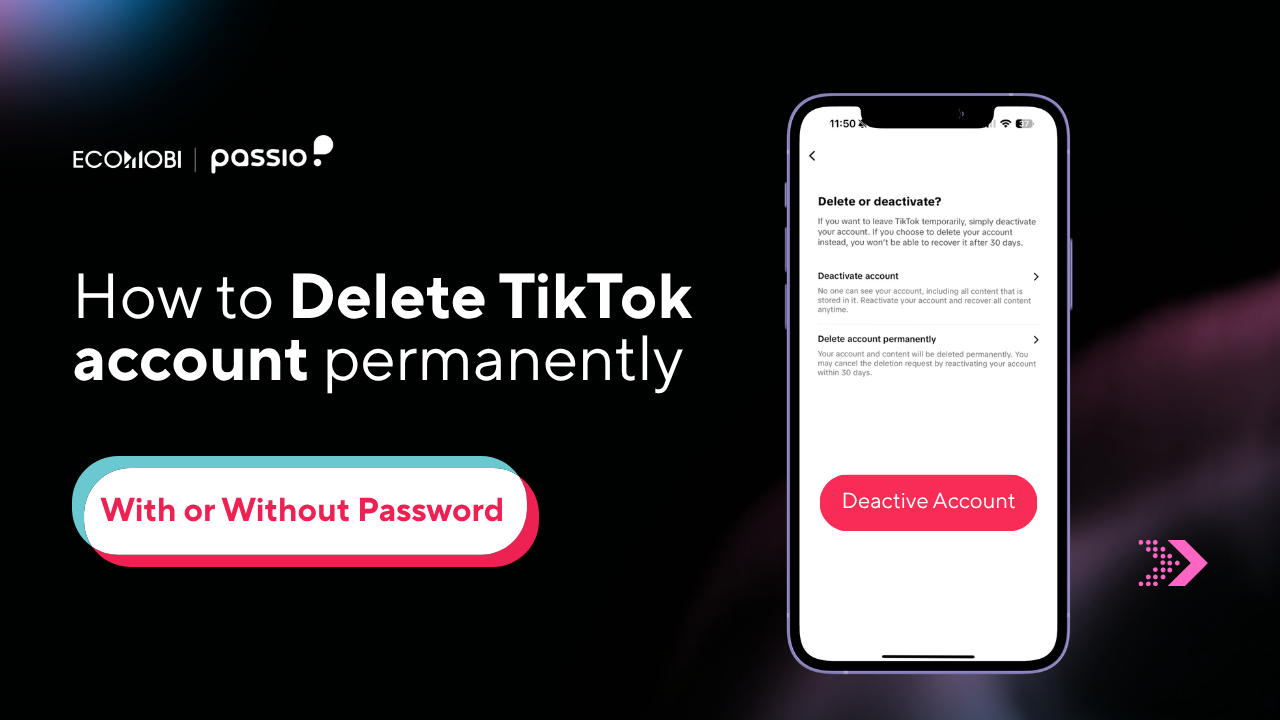
How to delete Tiktok account banner
  • Written by Lynn Do
  • April 9, 2026

Tired of the endless scroll or concerned about your digital privacy? Simply deleting the app from your phone is not enough; your data remains on TikTok’s servers. In this guide, Ecomobi provides the most updated instructions on how to delete TikTok account permanently, covering every scenario from lost passwords to managing linked Google accounts.

Quick Answer: How to delete TikTok

To delete your TikTok account permanently:

  • Open the TikTok app and go to your Profile.
  • Tap the Three-line menu (≡) → Settings and Privacy
  • Go to Account → Deactivate or delete account
  • Select Delete account permanently and provide a reason (optional).
  • Verify your identity and tap Delete Account.
  • Your account will be deactivated for 30 days and then permanently erased

Deactivate vs. Delete TikTok: What’s the difference?

Before you hit the final button, you must understand your options. Many users on Reddit regret permanent deletion because they didn’t realize they would lose their videos forever.

FeatureDeactivate TikTok (Temporary)Delete TikTok (Permanently)
DurationCan be reactivated anytime.Final after 30 days.
Public VisibilityHidden from everyoneHidden from everyone, then deleted forever
Data RetentionAll videos and drafts are saved.Data is purged after 30 days

How to back up TikTok data before deleting?

If you want to keep your TikTok data, backing it up is quick and simple. TikTok allows you to download information such as your profile details, activity history, and app settings.

  • Step 1: Open TikTok, log into your account, then click your profile picture in the top-right corner and go to Settings.
  • Step 2: Under the Privacy section, select Data to access the Download TikTok data page.
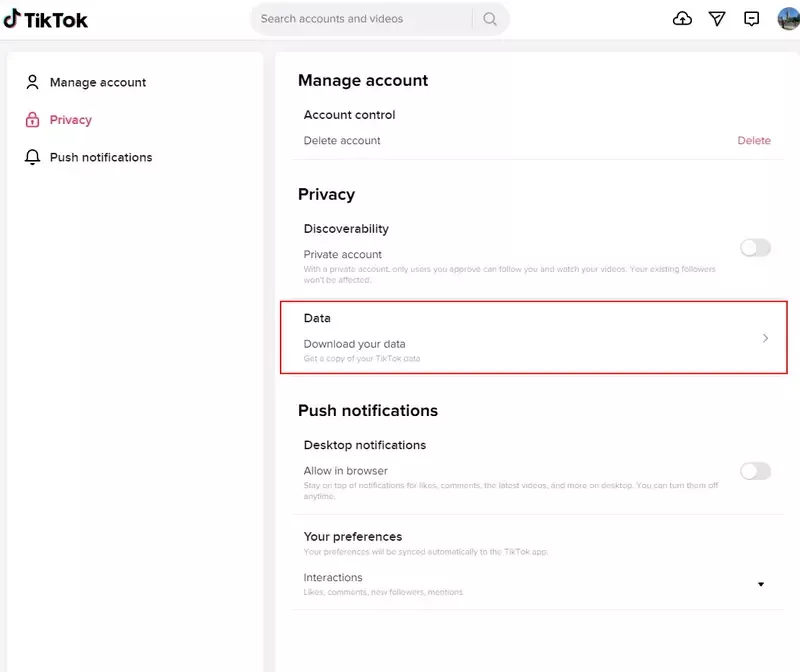
Instructions on how to back up TikTok data before deleting your TikTok account.
Instructions on how to back up TikTok data before deleting your TikTok account
  • On the Request data tab (where Select file format is chosen by default), pick your preferred format – either TXT for a human-readable file or JSON for a machine-readable one. Then click Request data.
  • TikTok will begin processing your data backup request, which may take a few days. Once it’s ready, you can download the file from the Download data tab on the Download TikTok data page – it will be provided in a ZIP file.
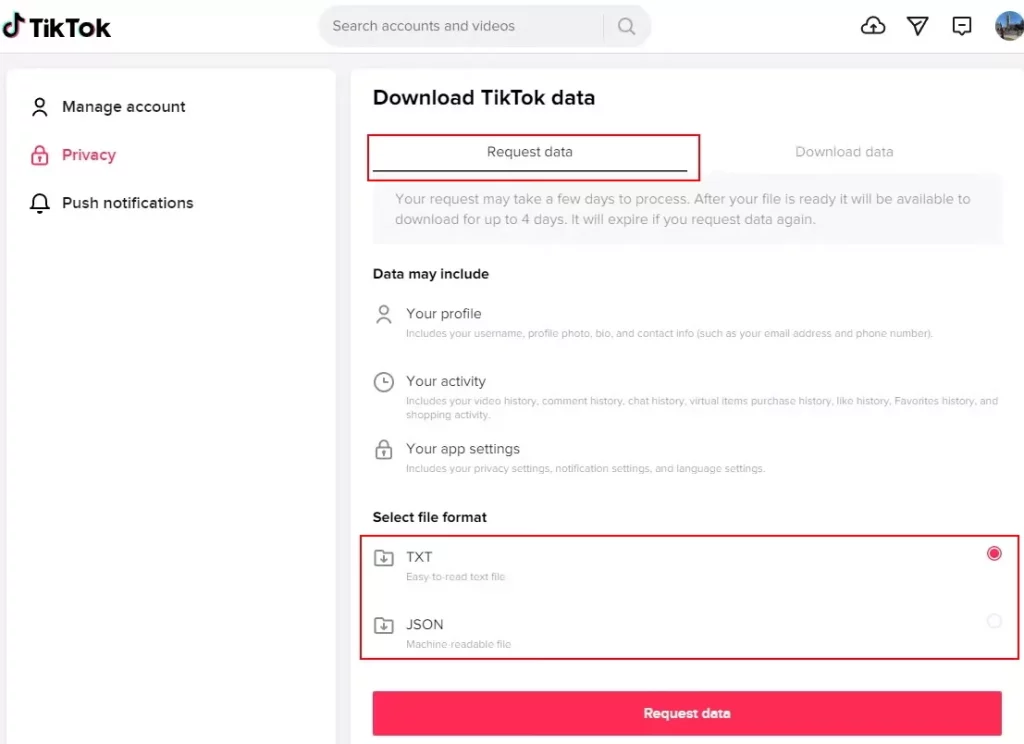
Steps to save your TikTok data before deleting your TikTok account
Choose the format you want TikTok to backup up your data in

Read more:

  • How to delete video in TikTok: A 2026 Comprehensive guide
  • How to recover TikTok account in 2026: Step-by-Step Guide

How to delete TikTok account on iPhone or Android 

The mobile app is the most common way to manage your profile. TikTok updated its interface in late 2026; here are the current steps:

  • Open TikTok: Go to your Profile icon in the bottom right.
  • Access Menu: Tap the Three-line menu (≡) in the top right corner.
  • Settings: Select Settings and Privacy → Account → Select Deactivate or Delete account > Select Delete account permanently.
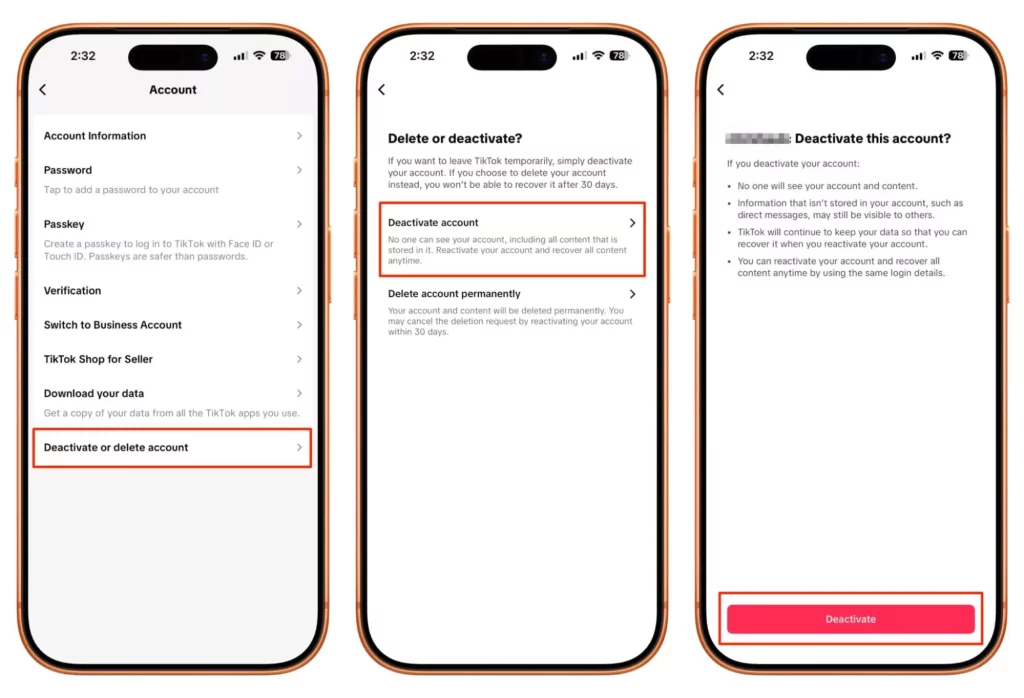
Three screenshots showing the TikTok Profile, Settings & Privacy, and Account menu path
How to delete TikTok account on mobile
  • Optional survey: Answer the “Why are you leaving?” survey (Optional: You can tap “Skip” in the top right).
  • Download your data: TikTok will ask if you want to request your data. Tap Request download if you want to save your videos.
  • Verification: Enter the 6-digit code sent to your phone/email.
  • Confirm: Tap Delete Account to start the 30-day deactivation period.

How to delete TikTok account online (Using a Web browser)

If you don’t have access to your phone or don’t have the app installed, you can delete TikTok account online using a web browser

  • Go to TikTok.com and log in.
  • Hover over your Profile picture in the top right corner → Click Settings.
  • Under the Manage account section, find Delete account.
  • Follow the prompts to verify your identity via your linked login method.
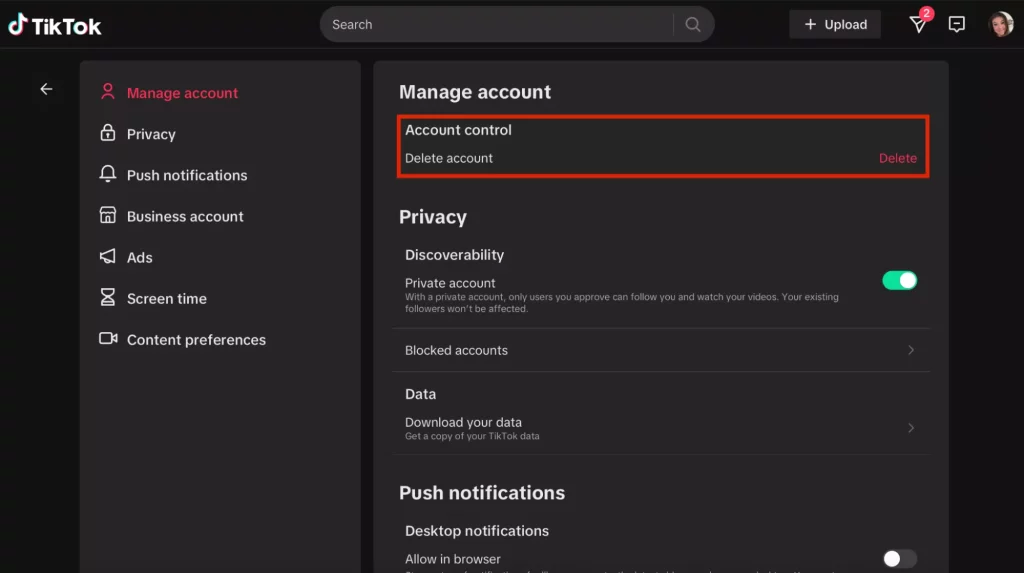
Desktop view of TikTok.com settings page showing the Manage Account deletion link - How to delete TikTok account online
You can also manage your account deletion via any standard web browser

How to delete TikTok account without password or email

Losing access to your account is a common pain point. Here is how to regain control:

Method 1: Using Linked social accounts

If you created your account using Google, Facebook, or Apple ID, you don’t need a TikTok password.

  • Select “Log in with [Service Name]” during the login phase.
  • Once inside, follow the standard deletion steps.

Method 2: The “Forgot Password” loophole

If you have the phone number linked to the account but no email/password:

  • Tap Log In → Use phone/email/username.
  • Select Forgot password? and enter your phone number to receive a reset code (6-digit)
  • Reset your password, log in, and proceed to deletion.

Method 3: Contacting TikTok Support

If you have no login access at all, use the TikTok Feedback Form. Provide your username and explain that you no longer have access to the email/phone. Mention you want to exercise your Data Privacy Rights (GDPR/CCPA) to have the account removed

You will need to provide ID verification.

How to delete TikTok account from Google

Many users want to know how to delete TikTok account from Google to ensure their Google data is no longer shared.

  • Step 1: Go to your Google Account Settings → Security
  • Step 2: Scroll down to Your connections to third-party apps & services 
  • Step 3: Find TikTok in the list and select Delete all connections.

Note: This does not delete your TikTok account; it only revokes TikTok’s access to your Google data.
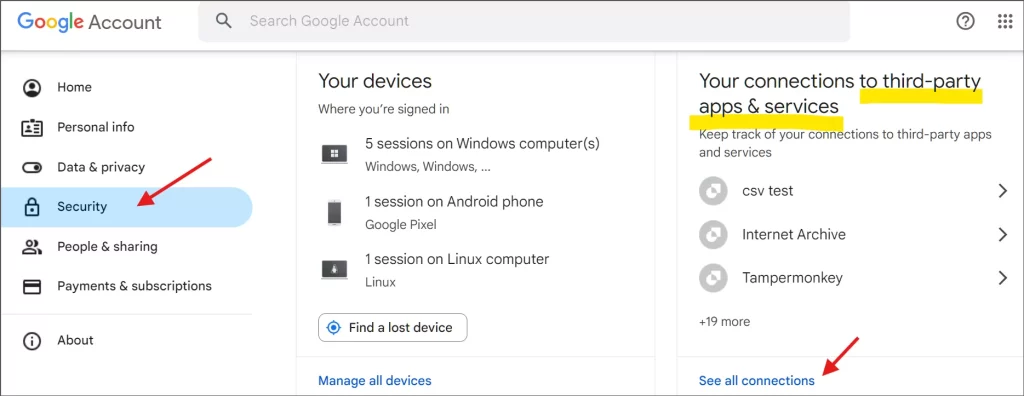
Google Account Security dashboard showing the 'Third-party apps with account access' section
Disconnect TikTok from your Google account to enhance your data privacy

Read more:

  • How to recover TikTok account in 2026: Step-by-Step Guide
  • TikTok Livestream Policy 2026: How to avoid bans & go live safely

How to delete TikTok account from another phone

If you lost your phone or it was stolen, you can still delete the account from a new device:

  • Step 1: Log in your account Tiktok on a new phone.
  • Step 2: Tap the Three-line menu (≡) → Go to Settings and Privacy → Security → Manage devices.
  • Step 3: Remove the old device session.
  • Step 4: Proceed with the standard Delete account steps listed above.
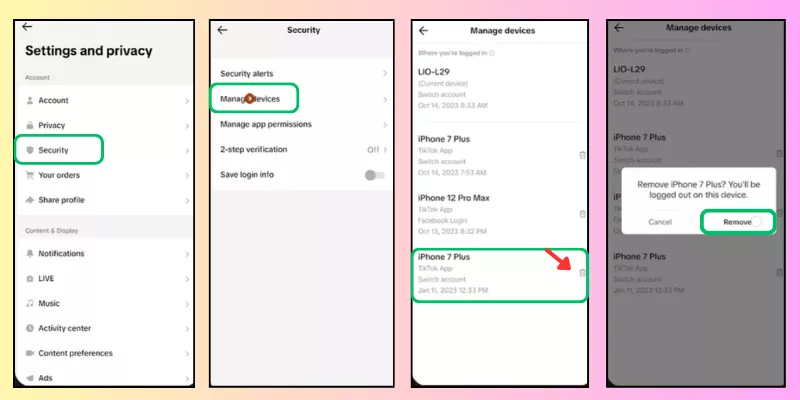
TikTok security settings showing the list of active logged-in devices
Log out of lost or stolen devices before initiating account deletion for extra security

What happens when you delete your TikTok account?

Before you pull the trigger, consider the “Digital Footprint” you leave behind:

  • Direct messages (DMs): These may remain visible to the recipient.
  • Purchases: Any TikTok Coins or virtual gifts are non-refundable.
  • Shared content: If others have downloaded your videos or “Duetted” them, those versions may remain on the platform.
  • Username: After 30 days, your username becomes available for anyone else to claim.

Troubleshooting: Why can’t I delete my account?

  • Missing information: You cannot delete an account if it doesn’t have a verified email or phone number attached. TikTok requires this for “Identity Verification” during deletion.
  • Recently changed info: If you just changed your password or email, TikTok may block deletion for 24 – 48 hours for security.
  • The “Delete” button is grayed out: Ensure you have completed the “Request Data” checkbox or the “Reason for leaving” survey

FAQ about How to delete Tiktok account

Can I recover my TikTok account after deleting it?

Only within the 30-day grace period. Simply log back into the app and tap “Reactivate.” After 30 days, the data is purged and recovery is impossible.

Does deleting TikTok delete my drafted videos?

Yes. Drafts are stored locally on your device, but they are linked to the account. When the account is deleted, your access to those drafts is removed.

How to delete your TikTok account without waiting 30 days

You cannot. TikTok enforces a mandatory 30-day deactivation period. During this time, your account is invisible to the public. If you do not log in within those 30 days, the account is gone forever. This is a security measure to prevent hackers from instantly wiping your digital history.

Contact Us:

– Fanpage: https://www.facebook.com/ecomobi.ssp
– Tiktok: https://www.tiktok.com/@ecomobipassiophilippines
– Instagram: https://www.instagram.com/ecomobi.philippines
– Tiktok Affiliate Partner (TAP): creator.ph@ecomobi.com
– Tiktok LinkShare: Hung Nguyen – Social Seller Development
Viber: +84 913 697 929 | Group Viber
Email: hungnq@ecomobi.com
Facebook: Official contact page
Read more:

How to grow Tiktok Followers and Like (Free & Effective 100%)

On This Page

  1. Quick Answer: How to delete TikTok
  2. Deactivate vs. Delete TikTok: What’s the difference?
  3. How to back up TikTok data before deleting?
  4. How to delete TikTok account on iPhone or Android 
  5. How to delete TikTok account online (Using a Web browser)
  6. How to delete TikTok account without password or email
    1. Method 1: Using Linked social accounts
    2. Method 2: The “Forgot Password” loophole
    3. Method 3: Contacting TikTok Support
  7. How to delete TikTok account from Google
  8. How to delete TikTok account from another phone
  9. What happens when you delete your TikTok account?
  10. Troubleshooting: Why can’t I delete my account?
  11. FAQ about How to delete Tiktok account
    1. Can I recover my TikTok account after deleting it?
    2. Does deleting TikTok delete my drafted videos?
    3. How to delete your TikTok account without waiting 30 days
Get Ecomobi monthly newsletter right in your inbox.
Loading

Related Success Stories

how-to-delete-video-in-Tiktok-guide

How to delete video in TikTok: A 2026 Comprehensive guide

Have you ever posted a TikTok only to realize there was a typo in the captions? Or perhaps you’re doing

Read More »
6 pillar content for Klook’s biggest commission upsize

Klook’s biggest commission upsize of the Year: 6 content pillars to x3 your earnings

Ecomobi is launching the biggest Klook commission upsize campaign of the year. With market-leading commission rates of up to 8%

Read More »
How to earn money online for students Philippines

How to earn money online for students Philippines 2026

If you are a student in the Philippines looking for a legitimate way to earn money without sacrificing your studies,

Read More »
Chiến dịch affiliate Gamivo hoa hồng 4% CPS trên Ecomobi

Ecomobi x Gamivo Affiliate: 4% CPS commission – Scale your global gaming sales

The opportunity to conquer the global market has arrived! Ecomobi is officially launching the Gamivo affiliate campaign – a world-leading

Read More »
Airpaz affiliate program via Ecomobi - earn 3.2% commission on flight bookings

Airpaz Affiliate Program: Complete Guide to Earning Flight Commissions via Ecomobi

If your audience searches for cheap flights – whether budget backpackers, frequent flyers, or family vacation planners – the Airpaz

Read More »
Introducing the Klook Affiliate Program – one of the most competitive commission structures in the market

Klook Affiliate Program: Commission up to 8% (Updated April/2026)

The world of online travel is booming, creating a massive opportunity for travel bloggers, influencers, and content creators to monetize

Read More »
Best dropshipping products Philippines 2026 — top 20 winning categories ranked by profit margin and RTO risk for Shopee, Lazada and TikTok Shop sellers

Best Dropshipping Products Philippines 2026: TOP 20 Winning Picks

Finding the right dropshipping products Philippines is the single most important decision you’ll make as an online seller. But there

Read More »
How to start dropshipping in the Philippines (2026 Guide)

How to start dropshipping in the Philippines (2026 Guide)

Starting a dropshipping business in the Philippines in 2026 is one of the most accessible paths to online income –

Read More »
join travel affiliate booking com with Ecomobi

Booking.com Affiliate Promgram: Commission up to 4.8% (Updated April.2026)

The travel industry is booming, and millions of people are booking accommodations online daily. What if you could earn commissions

Read More »
Ecomobi logo

Platform

  • Help Center
  • About Us
  • Contact Us
  • Help Center
  • About Us
  • Contact Us

For Brands

  • Overview
  • Social Commerce Solution
  • Affiliate Marketing
  • Livestream Commerce
  • Overview
  • Social Commerce Solution
  • Affiliate Marketing
  • Livestream Commerce

For Creators

  • Overview
  • Tools for Creators
  • Passio – Creator Platform
  • Host Training Program
  • Overview
  • Tools for Creators
  • Passio – Creator Platform
  • Host Training Program

For Publishers

  • Overview
  • Affiliate
  • Tools for Publishers
  • API Overview
  • Campaign Directory
  • Overview
  • Affiliate
  • Tools for Publishers
  • API Overview
  • Campaign Directory

Insights

  • Blog
  • Case Study
  • Event & Highlight
  • Eco Academy
  • Blog
  • Case Study
  • Event & Highlight
  • Eco Academy
Ecomobi logo
Copyright © 2023 Passio. All Rights Reserved.
  • Privacy Policy
  • Terms of Use
  • Privacy Policy
  • Terms of Use
  • Privacy Policy
  • Terms of Use
  • Privacy Policy
  • Terms of Use
Maximize your campaign ROI with performance-based solutions — from affiliate links to real-time tracking and ad amplification.Maximize your campaign ROI with performance-based solutions — from affiliate links to real-time tracking and ad amplification.

TAP campaign

Run affiliate campaigns at scale with Ecomobi’s trusted creator network. We manage recruitment, tracking, and optimization so your brand only pays for real sales, not impressions.

Drive guaranteed results with a pay-per-sale model and real-time affiliate performance insights.

GMV Performance Service

Monitor GMV across every creator and channel to see exactly where your GMV growth is coming from. This helps you double down on high-ROI partners and cut wasted spend.

Make smarter decisions by doubling down on high-ROI creators and cutting spend waste.

Ads Management

Amplify your best creator content with targeted paid ads on TikTok. Our in-house team manages campaigns end-to-end to boost reach, conversions, and maximize ROAS.

Amplify what works, without reinventing your content. Our hybrid model blends organic and paid to hit your KPIs faster.

For Brands
Contact us
For Creators
Sign up
Login

Are you ready to connect and maximize your revenue with Ecomobi today?

Loading