

How to add affiliate links in Instagram Reels is one of the biggest questions creators are asking as Instagram expands its affiliate shopping features. If your account has access to Add Products, you can now tag affiliate products directly in your Reels, making it easier for viewers to discover and buy products without leaving the video. This guide explains who can use the feature, how to set it up step by step, and what to do if you don’t see it on your account yet.
Quick Answer
Yes. If your Instagram account has access to the Add Products feature, you can add affiliate product links directly to Instagram Reels. Simply create a Reel, tap Add Products, paste your affiliate product link, tag the product, and publish your video. The feature is currently available only for eligible Professional accounts and is being rolled out gradually by Meta.
Can You Add Affiliate Links to Instagram Reels?
The answer is Yes, but the feature is currently being rolled out on a per-account basis.
According to Meta’s documentation and its partners, Instagram currently supports Creators adding Affiliate-enabled Product Links through the Add Products feature. In addition, the Creator community in Vietnam has reported several real-world cases where Shopee Affiliate products can be directly attached to Reels, even with Professional accounts of only around 1,000 followers.
Not only in Vietnam, but many international Creators have also reported that their accounts now have the Add Products option, allowing them to directly paste Affiliate Links when posting Reels. According to those who have experienced this feature, Instagram will process the link and create a Product Tag to direct viewers to the correct product page.
This indicates that Meta and Shopee are rolling out the feature in stages, rather than simultaneously to all users. If you don’t see the Add Products option, it’s likely your account is still in the process of being unlocked.
Shopee and Meta are expanding Affiliate Commerce on Instagram
During the Shopee Brands x Creators Summit 2026, Shopee announced that Instagram will become one of its priority platforms for expanding affiliate commerce across Southeast Asia.
Following the success of Facebook x Shopee Affiliate campaigns, Instagram Reels is expected to become another major source of affiliate traffic thanks to native product tagging. Instead of asking viewers to visit a creator’s profile and click a link in bio, creators can now embed affiliate products directly inside Reels using Instagram’s Add Products feature.
This is considered a significant signal for the KOC community, influencers, and publishers, especially as Instagram continuously adds new features to support Creator Commerce.

Instagram is becoming the next platform Shopee prioritizes for developing its Affiliate ecosystem in Southeast Asia. This update reflects Meta’s broader strategy of strengthening Creator Commerce while helping brands and creators reduce friction throughout the shopping journey.
Want to start earning commissions from Shopee? Learn how the Shopee Affiliate Program works, who can join, and how to maximize your earnings with the latest creator campaigns.
Why Adding Affiliate Links to Instagram Reels matters?
Previously, creators usually had to send viewers through several steps before they could purchase a product: Instagram Reel → Profile → Link in Bio → Shopee → Product Page → Checkout
Every additional click increased the chance that potential buyers would leave before completing a purchase. With the new Add Products feature, the buying journey becomes much simpler: Instagram Reel → Tap Product Tag → Product Page → Checkout
For creators, this provides several advantages:
- Tag up to 30 products in a single Reel.
- Create a more seamless shopping experience.
- Many campaigns offer commissions above 20% for Creators.
- Reduce purchase friction.
- Increase opportunities for affiliate commissions.
- Promote multiple products within a single piece of content.
Requirements for Adding Affiliate Links to Instagram Reels
Although Meta has not officially published country-specific eligibility requirements, creators who already have access generally share these characteristics:
- Use an Instagram Professional Account.
- Update Instagram to the latest version.
- Have access to the Add Products feature.
- Live in a region where the feature is being rolled out.
- Meet Meta’s account eligibility requirements.
Interestingly, follower count does not appear to be the deciding factor. Some creators with around 1,000 followers have already reported gaining access to the feature.
Adding affiliate links is just one way to monetize your audience. Explore more creator monetization strategies to diversify your income across multiple social media platforms.
How to Add Affiliate Links in Instagram Reels
If your Instagram account already supports the Add Products feature, you can add affiliate links in just a few simple steps.
Step 1: Create an Instagram Reel
Record or upload a video as usual. Content formats that typically perform well include:
- Product reviews
- Unboxing videos
- Tutorials
- Product comparisons
- Top products to buy
- Lifestyle videos combined with product introductions.
Step 2: Tap Add Product
- Click on Add Products > select Paste (Instagram requires this to be the link to a specific product). Depending on your account, Instagram may allow you to: Search for products or Select brands.
Step 3. Select the Affiliate Product
- Once Instagram recognizes the product link, it automatically generates a Product Tag.
- Review the product information carefully to ensure it links to the correct item.
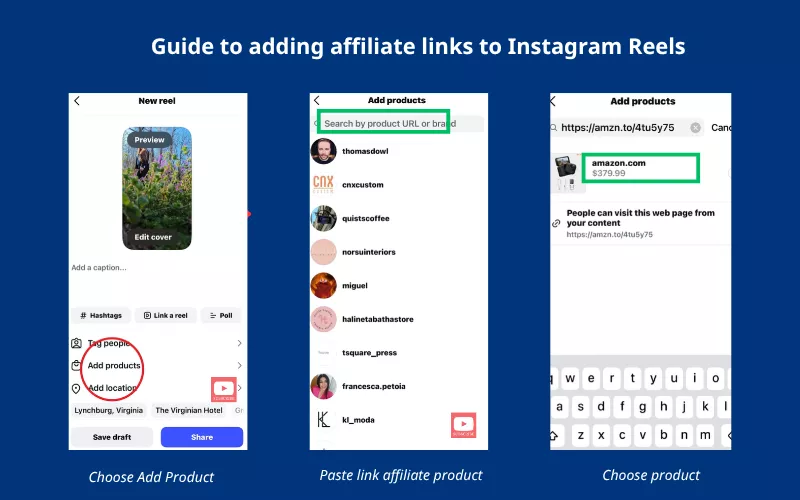
Step 4: Publish the Reel
After publishing, the product will appear directly in the video. Once live, viewers can tap the Product Tag directly inside the video to view product details and continue to the purchase page, creating a much shorter buying journey than using a traditional link in bio.
If you’re looking beyond Shopee, joining one of the best affiliate networks for creators gives you access to campaigns from multiple brands while tracking commissions from a single dashboard.
| Before | Now |
|---|---|
| Link in Bio | Product Tag |
| Multiple clicks | Direct access |
| Longer purchase journey | Shorter purchase journey |
| Lower conversion potential | Higher conversion potential |
| External navigation | Native Instagram experience |
Best practices for increasing Affiliate sales on Instagram Reels
Adding affiliate links is only the first step. To maximize conversions, consider these best practices:
- Capture attention within the first three seconds.
- Demonstrate the product instead of simply describing it.
- Tag only products that genuinely appear in the video.
- Keep videos concise and easy to follow.
- Include a clear call-to-action encouraging viewers to tap the product.
- Combine Reels with Stories to extend product visibility.
- Regularly test different content formats to identify what converts best.
FAQ about affiliate link feature on Instagram Reels
Why haven’t I seen the “Add Products” feature on Instagram Reels?
Not all Instagram accounts have this feature enabled at the same time. If you don’t see “Add Products” when posting Reels, it may be because:
– The feature is still being rolled out in stages by Meta.
– You haven’t switched to a Professional Account.
– The Instagram app hasn’t been updated.
– Your account doesn’t meet the eligibility requirements for the feature.
– The feature isn’t available in your region.
Why isn’t the Product Link showing?
Some Creators have reported:
– The link appears to some but not to others.
– The account owner doesn’t see the Product Tag, but followers do.
– The link appears after a few hours or days.
– Because the feature is still in the rollout phase, Meta will likely continue to optimize it in future updates.
How many products can I include in an Instagram Reel?
According to the latest update, Creators can include up to 30 products in an Instagram Reel. This makes it easy to create videos like “Top 10 Must-Buy Products,” “Shopee Haul,” or “Beauty Routine” with multiple products in the same content.
Do I need a large number of followers to use this feature?
Not necessarily. In fact, there are Professional accounts in Vietnam with around 1,000 followers that have activated the feature. This shows that the number of followers is not the only factor determining access.
Am I required to use the “Paid Partnership” label?
Not always. If you’re only participating in an Affiliate program and receiving commissions when orders are placed, you’re not required to use the Paid Partnership label. However, if a brand pays you to post content or collaborate on product promotion, you should use the Paid Partnership feature as per Instagram’s policy.
Does Instagram pay affiliate commissions?
No. Instagram provides the product tagging feature, while commissions are paid through the affiliate program or marketplace you participate in, such as Shopee Affiliate.
Can I use Amazon affiliate links in Instagram Reels?
Currently, Instagram’s Add Products feature primarily supports eligible commerce integrations and approved product catalogs. Availability may vary depending on your region and affiliate platform.
Final Thoughts
Instagram Reels is rapidly becoming one of the most promising platforms for affiliate marketing. With native product tagging, creators can shorten the customer journey, improve engagement, and create more opportunities to earn affiliate commissions directly from their content.
Although the feature is still rolling out gradually, now is the ideal time to optimize your Instagram Professional account and start experimenting with product-focused Reels.
If you’re looking to expand beyond a single marketplace, affiliate networks such as Ecomobi can help you access campaigns from multiple brands, manage commissions in one place, and monetize your content across different social platforms.